Choosing the right streaming device in 2026 can feel surprisingly complicated. With powerful options like Roku Ultra, Apple TV 4K, Fire TV Stick 4K Max, and Nvidia Shield TV Pro all competing for your TV’s HDMI port, many users struggle to figure out which one actually fits their needs. Some devices focus on simplicity and affordability, while others offer premium performance, gaming features, or deeper ecosystem integration. The best choice depends on how you watch—whether you want the smoothest interface, the widest app support, smart-home integration, or even console-level streaming performance.This complete 2026 comparison guide breaks down the key differences, features, pricing, and ideal users for each device so you can confidently pick the best streaming player for your setup.
Quick Comparison: Flagship Streamers at a Glance (2026)
After extensive research and real-world testing, we've broken down the Roku Ultra, Apple TV 4K, Fire TV Stick 4K Max and Nvidia Shield Pro four biggest contenders to help you make the right choice for your living room.
The table below provides an at-a-glance overview of the core differences between these four popular services.
| Feature | Roku Ultra | Apple TV 4K | Fire TV Stick 4K Max | Nvidia Shield Pro |
|---|---|---|---|---|
| Device Type | Streaming box | Premium streaming box | Streaming stick | High-performance streaming box |
| Primary OS | Roku OS | tvOS | Fire OS (Android-based) | Android TV |
| Video Support | 4K, HDR10+, Dolby Vision | 4K, HDR10+, Dolby Vision | 4K, HDR10+, Dolby Vision | 4K, HDR10, Dolby Vision |
| AI Upscaling | Basic | Advanced (A-Series Chip) | Moderate | Industry-Leading |
| Audio Support | Dolby Atmos | Dolby Atmos | Dolby Atmos | Dolby Atmos |
| Performance | Fast | Very fast | Good | Best-in-class |
| Gaming Capability | Very limited | Apple Arcade games | Casual games | Advanced game streaming |
| Voice Assistant | Roku Voice | Siri | Alexa | Google Assistant |
| Ecosystem Integration | Neutral | Apple ecosystem | Amazon ecosystem | Google ecosystem |
| Ethernet Port | Yes | Yes | No | Yes |
| Remote Features | Rechargeable / Lost Finder | Siri Remote (USB-C) | Alexa Voice Remote | Backlit "Toblerone" Remote |
| Release Year | 2024 | 2026 (rumored) / 2022 | 2023 | 2019 |
| Typical Price (2026) | ~$99 | ~$129–$149 | ~$55–$60 | ~$199 |
| Best For | Easy streaming | Apple users | Budget buyers | Power users & gamers |
Roku Ultra vs. Apple TV 4K vs. Fire TV Stick 4K Max vs. Nvidia Shield Pro: Deep Dive
1.Roku Ultra: Best Overall for Most People
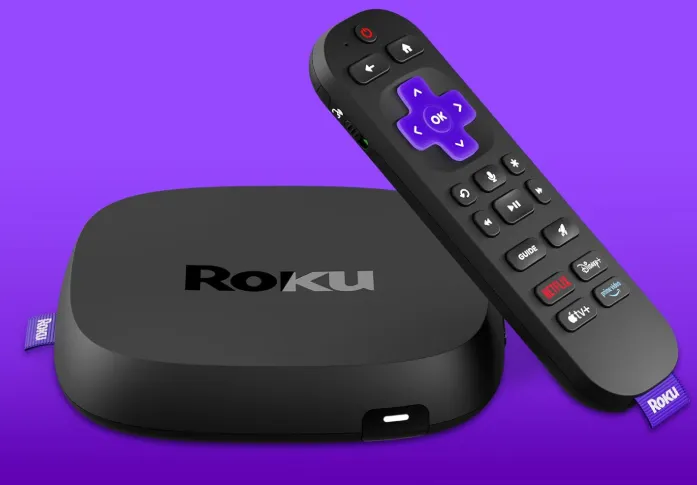
The Ultra is Roku's most feature-rich media streamer. It features Wi-Fi 6 for fast streaming and an Ethernet port for the most reliable network connection, allowing you to run a cable if desired. It comes with the second-generation Roku Voice Remote Pro that allows for hands-free voice control. It supports Dolby Vision HDR and Dolby Atmos spatial audio.
And, of course, Roku's interface is very simple and easy to use, with numerous media streaming apps and services, as well as Apple AirPlay support.
⏩Specs & Configurations
| Feature | Roku Ultra |
|---|---|
| Processor | Quad-core streaming processor |
| Max Resolution | 4K Ultra HD (3840×2160) |
| HDR Support | Dolby Vision, HDR10, HDR10+, HLG |
| Audio | Dolby Atmos support |
| RAM | ~2GB |
| Storage | ~8GB |
| Connectivity | Wi-Fi 6 + Ethernet |
| Ports | HDMI, USB 3.0, Ethernet |
| Remote | Roku Voice Remote Pro (rechargeable, backlit) |
| Voice Assistant | Roku Voice, Alexa, Google Assistant |
| Wireless | Dual-band Wi-Fi |
| Bluetooth | Yes (headphone mode) |
The device supports 4K HDR streaming with Dolby Vision and Dolby Atmos audio, delivering a cinematic experience for modern TVs.
Another advantage is Wi-Fi 6 and Ethernet connectivity, helping maintain stable streaming for high-bitrate 4K content.
Roku offers one of the most comprehensive app libraries in the world, often referred to as "Channels."
-
The Big Players: Netflix, Disney+, Max, Amazon Prime Video, Apple TV+, and YouTube.
-
Free Content: The Roku Channel provides thousands of free, ad-supported movies and live TV news.
-
Niche Interests: Massive support for international apps (Viki, Viu), sports (ESPN+, F1 TV), and specialty channels like Crunchyroll or Criterion Channel.
⏩Key Features for Fans
-
Private Listening: Plug headphones into the remote or use the Roku mobile app to listen to your TV through Bluetooth headphones—perfect for late-night binge-watching without waking the house.
-
Hands-Free Voice Control: You can say "Hey Roku, find my remote" or "Hey Roku, play House of the Dragon" without touching a button.
-
App-Agnostic Search: When you search for a movie, Roku shows you every platform it is on and ranks them by price (starting with "Free"), rather than prioritizing its own store.
-
Customizable Shortcuts: Two programmable buttons on the remote allow you to launch your most-used apps with one click.
⏩Pros & Cons
| Pros | Cons |
|
|
⏩Subscription Fees & Viewing Model
-
Device Cost: Typically retails for $99.99, though often on sale for $79.99.
-
Monthly Fees: $0.00. Roku does not charge a monthly subscription fee to use the device or the OS.
-
Revenue Model: Roku makes money through hardware sales, a cut of the subscriptions you sign up for through their store, and ads on the home screen and "The Roku Channel."
⏩Who is It Best For?
The Roku Ultra is the "Safe Bet" and is ideal for:
-
Families: It is durable, easy for kids to use, and the "Lost Remote" finder saves hours of frustration.
-
Seniors: The large icons and straightforward remote make it the most accessible device on the market.
-
Cord-Cutters: People who rely on a mix of many different apps and want a fast, reliable box with an Ethernet port.
-
Value Seekers: Those who want "Pro" features (Dolby Vision, Ethernet, USB port) without paying the $200 price tag of the Nvidia Shield.
⏩Where to buy Roku Ultra?
-
Official: Roku.com (Check the "My Offers" section if you are an existing user for potential 50% off deals).
2.Apple TV 4K : The Powerhouse for Ecosystem Devotees
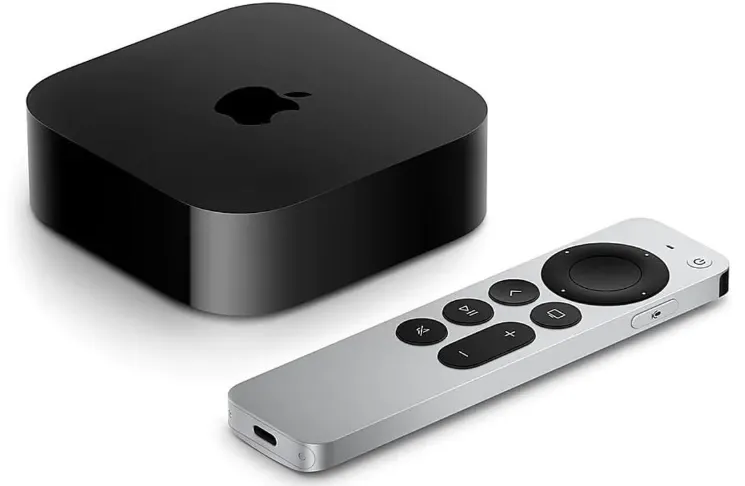
The Apple TV 4K is a capable media streamer that can serve as an Apple HomeKit hub if you prefer Apple's ecosystem for your smart home devices. It's also the only device that lets you use Siri rather than Alexa or Google Assistant (though only through the remote, since there's no hands-free model).
⏩Specs & Configurations
The latest Apple streaming box (3rd generation) focuses on speed, high-end video quality, and deep integration with the Apple ecosystem.
| Feature | Apple TV 4K (3rd Gen) |
|---|---|
| Processor | A15 Bionic chip |
| Storage | 64GB (Wi-Fi) / 128GB (Wi-Fi + Ethernet) |
| Video | 4K HDR, Dolby Vision, HDR10+ |
| Audio | Dolby Atmos, Dolby Digital 7.1 |
| Connectivity | Wi-Fi 6, Bluetooth 5.0 |
| Ports | HDMI 2.1 |
| Smart Home | HomeKit + Thread support (Ethernet model) |
| OS | tvOS |
| Remote | Siri Remote (USB-C) |
⏩What You Can Watch
Apple TV 4K has one of the most polished app stores in the industry.
-
Native Apps: Every major service (Netflix, Disney+, Max, Amazon Prime Video, YouTube) is optimized specifically for tvOS, often resulting in fewer crashes and higher bitrates than other platforms.
-
The Apple TV App: This serves as a central hub that "aggregates" content from your other apps (except Netflix), allowing you to see your "Up Next" queue in one place.
-
Live TV: Full support for YouTube TV, Hulu + Live TV, and Sling.
⏩Key Features for Fans
-
Solid Performance: The A15 Bionic chip delivers fast performance for all streaming needs .
-
Complete HDR Support: Supports 4K Dolby Vision and HDR10+ for enhanced picture quality .
-
Ecosystem Integration: If you have an iPhone, iPad, or Mac computer, you can use AirPlay to share photos, videos, and other content seamlessly .
-
Unique Remote: Features a touch-enabled click pad and offers access to Siri .
-
Privacy-Focused: Apple's interface includes less ad tracking than competitors.
⏩Pros & Cons
| Pros | Cons |
|
|
⏩Subscription Fees & Viewing Model
-
Device Cost: 2026 pricing usually sits at $129 (Wi-Fi) and $149 (Ethernet + 128GB).
-
Monthly Fees: $0.00 for the OS. You do not need an Apple subscription to use the box.
-
Optional Value: Many users subscribe to Apple One (which bundles Apple TV+, Music, Arcade, and iCloud+). Apple TV+ itself is typically ~$9.99/mo in 2026.
⏩Who is It Best For?
The Apple TV 4K is the "Premium Choice" and is ideal for:
-
iPhone Users: If you are already in the Apple ecosystem, the seamlessness is worth the price alone.
-
Cinephiles: Those who want the absolute best 4K Dolby Vision playback with zero interface clutter.
-
Privacy Seekers: People who are tired of their streaming boxes harvesting their data for targeted ads.
-
Smart Home Enthusiasts: If you use HomeKit or Matter devices, this is the best hub you can buy.
⏩Where to buy Apple TV 4K?
-
Apple Store: Best for "Certified Refurbished" units (often $109).
-
Amazon / Best Buy: Usually the best place for a $10–$20 discount on new units.
-
B&H Photo: Often has the best stock for the 128GB Ethernet version.
3.Fire TV Stick 4K Max: Best for speedy navigation
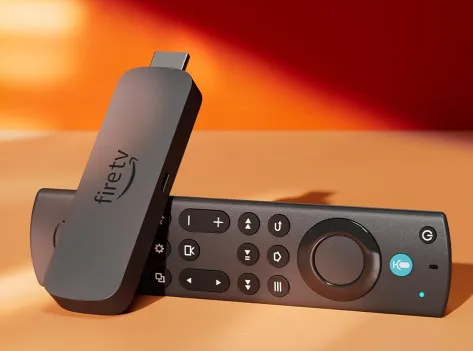
Amazon's flagship streaming stick packs impressive power into a tiny form factor. The 2023 model (2nd generation) features a 2.0 GHz quad-core processor and is the fastest streaming stick on the market . With over 21,000 reviews averaging 4.5 stars, it's proven popular with consumers .
The Fire TV Stick 4K Max supports 4K and HDR for crisp, high-quality streaming and offers speedy navigation. Its voice remote makes searching easy, and it responds well to Alexa when you hold the button. There’s wide app support via the Amazon store, and extras like wi-fi 6 and picture-in-picture for doorbell feeds add real value.
⏩Specs & Configurations
| Feature | Fire TV Stick 4K Max |
|---|---|
| Processor | 2.0 GHz quad-core |
| RAM | 2 GB |
| Storage | 16 GB |
| Max Resolution | 4K Ultra HD (up to 60fps) |
| HDR Formats | Dolby Vision, HDR10, HDR10+, HLG |
| Audio | Dolby Atmos |
| Operating System | Fire OS (Android-based) |
| Connectivity | Wi-Fi 6E |
| Bluetooth | Yes |
| Remote | Alexa Voice Remote Enhanced |
| Voice Control | Alexa |
| Ports | HDMI + Micro-USB power |
The device includes 16GB storage (double the previous generation) and a 2.0GHz quad-core processor, making it Amazon’s fastest Fire TV streaming stick.
It also supports Wi-Fi 6E, helping deliver smoother 4K streaming in homes with many connected devices.
⏩What You Can Watch
The Fire TV ecosystem is built around the Amazon Appstore, which is one of the most populated in the world.
-
Amazon Prime Video: Naturally, this is the centerpiece of the experience.
-
Global Apps: Netflix, Disney+, Max, YouTube, Peacock, and Paramount+.
-
Free Streaming: Freevee and Pluto TV are deeply integrated into the "Live" tab.
-
Cloud Gaming: A major 2026 focus. You can play high-end games via Amazon Luna and Xbox Cloud Gaming (Beta) directly on the stick with a Bluetooth controller.
⏩Key Features for Fans
-
Lightning Fast: Quad-core 2.0 GHz processor with 2GB RAM makes app launching and navigation 40% faster than standard Fire TV sticks .
-
Wi-Fi 6E Support: Tri-band Wi-Fi (2.4 GHz, 5 GHz, and 6 GHz) reduces congestion in crowded homes—critical for stable 4K streaming .
-
16GB Storage: Double the capacity of other Fire TV models for more applications and games .
-
Complete HDR Support: Dolby Vision, HDR, and HDR10+ for enhanced viewing .
-
Ambient TV Mode: Turns your TV into a smart display showing art, photos, and widgets when idle—exclusive to 4K Max .
-
Alexa Integration: Control smart home devices, view security cameras picture-in-picture .
-
Dolby Atmos Support: For immersive audio with compatible sound systems
⏩Pros & Cons
| Pros | Cons |
|
|
⏩Subscription Fees & Viewing Model
-
Device Cost: MSRP is $59.99, but it is frequently on sale for $39.99 during Prime Day or Black Friday.
-
Monthly Fees: $0.00. There is no fee to use the Fire TV platform.
-
Prime Integration: While not required, the device is significantly better if you have Amazon Prime ($14.99/mo), which unlocks the Prime Video library and ad-free music.
⏩Who is It Best For?
The Fire TV Stick 4K Max is the "Smart Utility" choice and is ideal for:
-
Prime Members: If you already pay for Prime, this is the most logical ecosystem.
-
Smart Home Enthusiasts: Anyone who uses Alexa to control lights, cameras, or thermostats.
-
Secondary TVs: It is the perfect, low-cost solution for a bedroom, kitchen, or guest room TV.
-
Travelers: Its small size makes it the best device to bring to hotels to bypass their limited cable options.
⏩Where to buy Fire TV Stick 4K Max?
-
Amazon (Official): Always the best place for the most recent model and the deepest discounts.
-
Best Buy: Great for "Buy Online, Pick Up In-Store" (BOPIS) if you want it today.
-
Target: Often stocks them in the electronics section with similar pricing to Amazon.
-
B&H Photo Video: A reliable alternative for US-based shoppers.
4.Nvidia Shield TV Pro: The Enthusiast's Choice
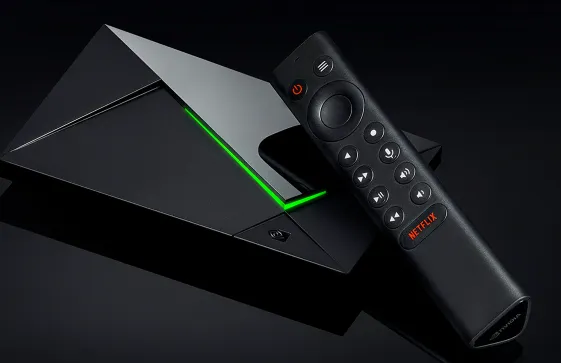
Originally released in 2019 but continuously updated with software features, the Shield TV Pro remains the undisputed king for home theater enthusiasts and gamers . Seven years of software updates demonstrate Nvidia's commitment to long-term support, keeping the device secure and compatible with evolving streaming standards
It handles 4K HDR with Dolby Vision and Dolby Atmos and has built-in storage, Ethernet, and USB ports. It uses AI-based upscaling to enhance HD video to near-4K quality, and it also doubles as a gaming machine via GeForce Now (a platform that allows players to stream the games they own) and supports Google Assistant with built-in Chromecast.⏩Specs & Configurations
| Feature | Details |
|---|---|
| Processor | NVIDIA Tegra X1+ with 256‑core GPU |
| RAM | 3 GB |
| Internal Storage | 16 GB (expandable via USB) |
| Video | 4K HDR, Dolby Vision (via software support), HDR10 |
| Upscaling | AI‑enhanced upscaling to 4K |
| Audio | Dolby Atmos, Dolby Digital Plus, DTS‑X passthrough |
| Connectivity | Gigabit Ethernet, Wi‑Fi (802.11ac), Bluetooth 5.0 |
| Ports | 2× USB 3.0, HDMI 2.0b |
| OS | Android TV with Chromecast built‑in |
| Voice Assistants | Google Assistant built‑in (works with Alexa devices) |
| Remote | Backlit remote with voice search & locator |
Notes: Includes USB ports for storage expansion, media playback, peripherals (keyboard, cameras, etc.), and a robust Android TV ecosystem.
⏩What You Can Watch
Running on Android TV (Google TV interface), the Shield Pro has access to the most open app ecosystem:
-
Streaming Giants: Netflix, Disney+, Max, Prime Video, and YouTube—all with full 4K HDR support.
-
Plex & Kodi: It is the world's most popular client for Plex and Kodi, capable of acting as both a player and a low-power Media Server.
-
IPTV & Sideloading: Being Android-based, it allows for easy installation of third-party apps and IPTV services that aren't available on the Apple or Roku stores.
⏩Key Features for Fans
-
AI Upscaling: The Tegra X1+ processor uses machine learning to upscale HD content to near-4K quality—magical for older shows, anime, and YouTube streams .
-
Lossless Audio Pass-through: Supports Dolby Atmos, DTS-HD Master Audio, TrueHD, and DTS:X—essential for home theater setups with AV receivers. Unlike many newer boxes, it does not downmix or compress high-quality audio formats .
-
Built-in Plex Server: Can transcode 4K HEVC content efficiently, manage large libraries, and stream media across local networks .
-
Gaming Powerhouse: Access to GeForce Now (cloud), GameStream (local PC), and thousands of Android games .
-
Full Google Integration: Google Assistant, Chromecast built-in, and smart home controls .
-
Expandable Storage: USB 3.0 ports for external drives and media libraries .
⏩Pros & Cons
| Pros | Cons |
|
|
⏩Subscription Fees & Viewing Model
-
Device Cost: Retails for approximately $199.99. It rarely goes on sale for less than $170.
-
Monthly Fees: $0.00. There is no fee to use the Android TV OS.
-
Gaming Costs: While the hardware is a one-time purchase, the GeForce NOW service (to play PC games) ranges from a free tier to $19.99/mo for the 4K Ultimate experience.
⏩Who is It Best For?
The Nvidia Shield TV Pro is the "Enthusiast's Choice" and is ideal for:
-
Home Theater Owners: Anyone with an expensive AV receiver and a 5.1.2 (or higher) speaker setup.
-
Plex Power Users: Those who have a massive library of ripped Blu-rays and want to watch them in full quality.
-
Gamers: People who want to play PC-quality games in the living room without buying a bulky console or PC.
-
Tech Enthusiasts: Users who want the freedom of Android TV to customize their interface and sideload apps.
-
Amazon: Usually has the most consistent stock and fast shipping.
-
Best Buy: The best place to buy if you want to pick it up in-store immediately.
-
B&H Photo Video: Often a great source for tax-free shipping (depending on your state) and professional tech support.
-
Nvidia Official Store: Occasionally offers bundles with controllers or gaming subscriptions.
The 4 Streaming Devices Compared: Key Differences You Should Know
1.Key Differences Explained
🆚Performance
Fastest → Slowest
-
Nvidia Shield Pro
-
Apple TV 4K
-
Roku Ultra
-
Fire TV Stick 4K Max
Shield and Apple TV offer the smoothest navigation and fastest loading speeds.
🆚Interface Experience
| Device | Experience |
|---|---|
| Apple TV 4K | Cleanest UI, minimal ads |
| Roku Ultra | Simplest interface |
| Nvidia Shield | Most customizable |
| Fire TV Stick | Ad-heavy but powerful |
🆚Ecosystem Integration
| Ecosystem | Best Device |
|---|---|
| Apple | Apple TV 4K |
| Amazon Alexa | Fire TV Stick 4K Max |
| Google Assistant | Nvidia Shield |
| Neutral platform | Roku Ultra |
🆚Gaming Capability
| Device | Gaming Features |
|---|---|
| Nvidia Shield Pro | GeForce Now cloud gaming |
| Apple TV 4K | Apple Arcade |
| Fire TV Stick 4K Max | Casual Android games |
| Roku Ultra | Very limited |
2.Complete Comparison & Final Recommendations
📈Side-by-Side Breakdown
| Category | Winner | Why |
|---|---|---|
| Ease of Use | Roku Ultra | Simplest interface, best remote, works for everyone |
| Performance | Apple TV 4K (rumored) | A17 Pro with 8GB RAM would crush everything |
| Value | Fire TV Stick 4K Max | Most features for under $60 |
| Picture Quality | Tie: Apple/Nvidia | Apple for HDR10+, Nvidia for AI upscaling |
| Audio Quality | Nvidia Shield Pro | Lossless audio pass-through unmatched |
| Gaming | Nvidia Shield Pro | GeForce Now + GameStream + emulation |
| Smart Home Integration | Fire TV Stick 4K Max | Deep Alexa integration, picture-in-picture cameras |
| Future-Proofing | Apple TV 4K (rumored) | Wi-Fi 7, AV1, 8GB RAM, AI capabilities |
| Remote Control | Roku Ultra | Backlit, rechargeable, lost-remote finder |
| Longevity | Nvidia Shield Pro | 7+ years of software updates |
📌Breakdown of 2026 Top Contenders:
-
Apple TV 4K (Best Overall Premium): Offers unmatched speed, excellent video/audio quality, and seamless integration for Apple users.
-
Roku Ultra (Best All-Rounder/Interface): Known for a simple, neutral interface, wide app support, Dolby Vision/Atmos, and a rechargeable remote.
-
Fire TV Stick 4K Max (Best Value/Performance): Features Wi-Fi 6E, 16GB storage, and fast navigation, making it a high-performance, compact option.
- Nvidia Shield TV Pro (Best for Power Users): Superior AI upscaling, gaming capabilities, and performance, ideal for heavy, advanced users.
🔍Which One Should You Choose?
✅Choose the Roku Ultra if:
-
You want something that "just works" without learning curves
-
You're tired of hunting for remotes in the dark (backlit keys + finder)
-
You have multiple family members with different streaming preferences
-
You value simplicity over flashy features
-
You want Ethernet and USB ports for versatility
✅Choose the Apple TV 4K if:
-
You're already using iPhone, Mac, and AirPods
-
You want the fastest potential performance (especially if the 2026 model delivers)
-
Gaming on your TV appeals to you
-
You care about privacy and minimal ad tracking
-
You want seamless AirPlay integration
✅Choose the Fire TV Stick 4K Max if:
-
You're on a budget but want premium features
-
You have a Wi-Fi 6E router
-
You're an Amazon Prime member
-
Xbox Game Pass cloud gaming interests you
-
You want to modernize an older TV without spending much
✅Choose the Nvidia Shield TV Pro if:
-
You have a home theater with lossless audio
-
You run a Plex server or have large local media libraries
-
You want to stream games from your gaming PC
-
AI upscaling of old content matters to you
-
You value long-term software support and open flexibility
📌Final Verdict (2026)
Each device serves a different type of viewer:
-
Best overall streaming experience: Apple TV 4K
-
Best simple streaming device: Roku Ultra
-
Best budget option: Fire TV Stick 4K Max
-
Best for power users and gamers: Nvidia Shield Pro
If you simply want reliable streaming with minimal setup, Roku Ultra or Fire TV Stick 4K Max will be enough. But if performance, gaming, or ecosystem integration matters to you, Apple TV 4K or Nvidia Shield Pro are worth the upgrade.
Streaming Devices FAQs: Quick Answers Table
Choosing between these four giants in 2026 often comes down to your specific "digital lifestyle." Whether you prioritize a clean interface, home theater audio, or a budget-friendly stick, each has a distinct "personality."
Here is a concise comparison table addressing the most common pain points and user questions.
| Common Question | Issue / Concern | Recommended Approach / Solution |
|---|---|---|
| Which device is best for beginners? | Some users find interfaces confusing or overwhelming. | Roku Ultra is simplest and most beginner-friendly with an intuitive interface. Fire TV Stick 4K Max is also easy but shows more ads. |
| Which device offers the best video & audio quality? | Differences in HDR, Dolby Vision, and Dolby Atmos support. | Apple TV 4K and Nvidia Shield TV Pro support full Dolby Vision & Atmos. Roku Ultra supports Dolby Vision but limited Dolby Atmos. Fire TV Stick supports Dolby Vision/Atmos but less premium experience. |
| Which is best for gamers? | Streaming and Android/console games. | Nvidia Shield TV Pro supports GeForce NOW cloud gaming and Android games. Fire TV Stick 4K Max can handle casual gaming, but not intensive games. |
| Which works best with Apple devices? | Ecosystem integration, AirPlay, HomeKit, and iCloud. | Apple TV 4K is the obvious choice due to seamless integration with iPhone, iPad, Mac, and HomeKit devices. |
| Which device is best for budget-conscious users? | Low-cost device with 4K support. | Fire TV Stick 4K Max offers 4K HDR, Dolby Vision, and Dolby Atmos at a very competitive price. Roku Ultra is more expensive but still mid-range. |
| Which supports local media playback and media servers? | Users want Plex, Kodi, or USB storage support. | Nvidia Shield TV Pro excels with Plex/Kodi and USB storage. Roku has limited local playback, Apple TV has limited formats, Fire TV Stick supports some local playback via apps. |
| Which device has the fastest performance? | App loading, navigation, and 4K streaming speed. | Apple TV 4K (A15 chip) and Nvidia Shield TV Pro (Tegra X1+) are the fastest. Fire TV Stick 4K Max is good for a stick, Roku Ultra is slightly slower but smooth. |
| Which device receives long-term updates? | Future software support and OS updates. | Apple TV 4K offers the longest software support. Nvidia Shield Pro receives Android TV updates. Roku and Fire TV receive regular updates but may be limited after several years. |
| Which device works best for smart home integration? | Voice assistants, smart lights, cameras, HomeKit, Alexa. | Apple TV 4K for HomeKit/Apple ecosystem. Fire TV Stick for Alexa. Nvidia Shield supports Google Assistant. Roku Ultra supports limited voice functions and smart home control. |
| How to avoid ads or cluttered home screens? | Fire TV and some Roku channels show ads/promotions. | Apple TV 4K has minimal ads. Roku has sponsored content on some channels. Fire TV Stick shows more ads; consider using ad-blocking features or skipping promoted apps. |
Choosing the right 4K streamer depends on your ecosystem. Pick Apple for privacy, Nvidia for home cinema, Roku for simplicity, or Fire TV for value. Upgrade your binge-watching today!